You know it happened. You just can’t remember when it started.
My AFib Companion keeps the record for you — when an episode started and stopped, what you felt, what you took, what you’d had that day — and turns it into a summary you can hand to your cardiologist.
iPhone, iOS 17 or later. 30 days free, then $9.99/month or $59.99/year. There is no free version.
If you think you are having a medical emergency, call 911 (or your local emergency number). This app is not for emergencies and cannot get help for you.
The part nobody warns you about
The diagnosis is the thing everyone talks about. The paperwork is the thing you actually live with.
You get home from the hospital with a name for it and a couple of prescriptions, and then it’s on you to keep track. Not once. Every week, indefinitely, in the middle of ordinary life.
You’ll know some of these
- It started sometime after dinner. You noticed it at nine. You have no idea when it actually began, and you’re not sure when it stopped.
- “How often is it happening?” A few times? More than last time? You end up guessing in front of the one person who needed a real answer.
- You’re standing in the kitchen at seven in the morning trying to work out whether you already took the tablet, or whether you’re remembering yesterday.
- You wonder if it was the second coffee, or the glass of wine, or the four hours of sleep, or the work thing — or nothing at all, which is somehow worse.
- Every new doctor, every new nurse, and you’re reciting your medication list from memory, hoping you’ve got the doses right.
None of that is a memory problem. It’s a record-keeping problem. A phone is much better at record-keeping than a person is in the middle of an episode.
That’s the whole idea. Log it while it’s happening, in a few taps, and stop carrying it in your head.
What it actually does
Seven things. No feature you have to hunt for, and nothing that pretends to be a doctor.
-
When an episode starts
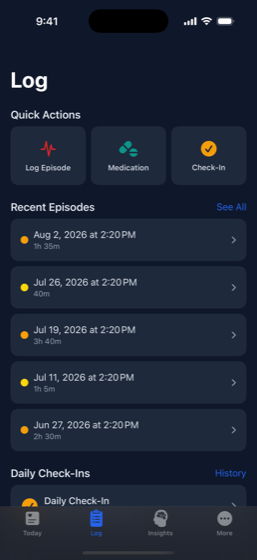
One button: I’m Having an Episode. A timer starts. That’s the only thing you have to do while you feel awful.
Everything else can wait. When you’re ready — during or after — you add how bad it was on a one-to-five scale, tick the symptoms you had (palpitations, racing heart, shortness of breath, dizziness, chest discomfort, fatigue, anxiety, lightheadedness, weakness, confusion), and write anything you want to remember.
When it stops, you tap End Episode. The app has the exact duration, because it was counting.
Only then does it ask what might have set it off — caffeine, alcohol, poor sleep, stress, exercise, dehydration, a large meal, cold, heat, illness, or “unknown”, which is an honest answer and a valid one.
-
Medications, and whether you actually took them
Add each medication with its dose, how often you take it, and the times of day. The app knows the difference between a blood thinner, a rate-control drug and a rhythm-control drug, and it labels them accordingly.
Reminders are deliberately restrained: at most three per dose — one at the scheduled time, then follow-ups fifteen and thirty minutes later noting that the dose isn’t marked as taken. You mark doses taken, late, skipped or missed. Over weeks that becomes an adherence record, per medication, that neither of you has to reconstruct from memory.
You can also track pill counts and get a refill reminder before you run out, and flag a “pill in the pocket” medication as what it is.
-
Your Apple Health data, in the same place
With your permission, the app reads what your iPhone and Apple Watch have already recorded, so it sits alongside what you logged by hand: heart rate, resting heart rate, heart rate variability, ECG results, AFib History, irregular rhythm notifications, high and low heart rate notifications, VO2 max, blood oxygen, sleep and steps.
It reads. It does not write anything back to Apple Health, and it does not watch your heart or alert you to anything. Your Apple Watch does that job, and it does it better.
-
A thirty-second daily check-in
Once a day, at a time you choose: how you feel, alcohol, caffeine, sleep quality and hours, stress, exercise, hydration, and a notes field if something’s worth saying.
It takes half a minute and it’s the raw material for the pattern analysis below. Skip a day and nothing scolds you.
-
Patterns, worked out on your phone
Once there’s enough logged, the app compares your episodes against your check-ins and your logged triggers, and tells you what lines up and how strongly. It writes a weekly summary — rhythm, symptoms, adherence, triggers — and a plain-language read on how your medication record is going.
Two honest caveats, because this is the part that gets oversold everywhere else:
- Correlation is not cause. If your episodes cluster after short nights, that’s worth mentioning to your cardiologist. It is not a finding, and the app doesn’t pretend it is.
- This runs on your phone. The analysis is computed on the device itself, and no health data is sent anywhere to be analysed — not to an AI company, not to anyone. Your records themselves do sync to a private account on our server, so you don’t lose them with your phone; exactly what that covers is set out below.
-
The things you hope you never need
An emergency card on one screen: your name, that you have atrial fibrillation, which type, your current medications with anticoagulants flagged in red, and a prominent banner if you’re on a blood thinner. You can show it or share it as text.
A CHA2DS2-VASc calculator, clearly labelled as educational. It’s the same score your clinician uses as one input among several. Seeing your own number is useful for understanding a conversation you’re already having. It is not a verdict, and it is not a reason to change anything you’re taking.
Plus fifteen plain-English articles on AFib — what it is, the types, symptoms, stroke risk, medications, cardioversion, ablation, triggers, exercise, diet, sleep, anxiety, travelling, when to go to the emergency room, and how to prepare for an appointment.
-
Small things that turn out to matter
- Home screen widgets — today’s status, latest heart rate with a sparkline, today’s medications with mark-as-taken, and a one-tap mood log.
- Face ID or Touch ID lock, with your passcode as fallback, so a health record isn’t sitting open on an unlocked phone.
- Full CSV export, any time, opens in any spreadsheet. Your episodes, medications, dose logs, check-ins and readings.
- Delete your account and all its data from inside the app, without emailing anyone to ask permission.
-
Today — your heart data and today's doses, in one glance.
-
Log — episodes with the detail your cardiologist asks for.
-
Insights — patterns across weeks, computed on your phone.
-
Doctor report — one PDF, ready for your appointment.
The doctor report
The report is the point
An appointment with a cardiologist is short. A good chunk of it disappears into questions you’re answering from memory, badly, while trying to remember whether it was three episodes or four.
Tap one button and the app builds a PDF covering the last 30, 60 or 90 days. Hand it over, email it, or print it and put it on the desk.
What’s in it
- Who you are — age, biological sex, AFib type, diagnosis date
- Your episodes — how many, average severity, average duration, and your five most common symptoms and five most common triggers with counts
- Your heart data — latest and resting heart rate, heart rate variability, and AFib History percentage where Apple Health has it
- Your medications — overall adherence, then each medication individually with doses taken out of doses due
- Your lifestyle record — average mood, average sleep, how many high-stress days, how many days with alcohol
- A disclaimer at the bottom, in writing, stating that this is self-reported data and Apple Health readings, that it’s a discussion aid, and that it is not a medical record or a diagnosis
Two things worth saying plainly
It’s built on your phone. The PDF is generated on the device and handed straight to iOS’s share sheet. It isn’t rendered on a server and there’s no copy of it sitting in a bucket somewhere.
It’s a conversation starter, not a conclusion. Nothing in it interprets your condition or suggests treatment. It just puts the facts of your last three months on one page so the fifteen minutes go on the conversation instead of the recall.
What actually happens to your data
Health apps say “your privacy matters” and then decline to say anything specific. Here’s the specific version, including the parts that are less flattering than a slogan.
What stays on your phone
The analysis. Weekly summaries, trigger correlations and adherence analysis are all computed on the device, by code that ships inside the app. Working them out makes no network call, so no health data is sent anywhere to be analysed. No third-party AI service is involved — not OpenAI, not Google, not anyone. Your health data is not used to train any model. The finished insights are then stored in your account like any other record, so they survive a new phone — they are listed below.
The PDF. Built on your phone, handed to the iOS share sheet, and cleared from memory when you close the sheet.
What does leave your phone
Your records sync to a private account on our backend, so they survive a lost phone, a new phone, or a reinstall. That means the following is stored on a server:
- Heart rate, resting heart rate, heart rate variability and step count from Apple Health
- Episodes, and their symptoms and triggers
- Medications and your dose logs
- Daily check-ins
- The insights the app generated on your phone
- Your profile: email, display name, AFib type, diagnosis date, date of birth, biological sex — and, if you enter one, an emergency contact’s name and phone number
That last one deserves calling out. If you fill it in, you’re storing a third person’s contact details — someone who never installed this app. It’s stored in your account, under the same protections as the rest of your data, and it’s deleted when you delete your account. It’s also entirely optional, and the app works without it.
How it’s protected
The database is PostgreSQL, hosted with Supabase in the United States (Oregon). Every row is keyed to your account and protected by row-level security, so your account can only read your own rows. Data is encrypted in transit and at rest.
No system is perfectly secure and anyone who tells you otherwise is selling something. That’s what’s in place.
What we don’t do
- No advertising, anywhere in the app
- No analytics SDKs and no third-party trackers
- Your data is never sold, rented, or shared for anyone’s marketing
- Nothing goes to insurers, employers, data brokers or researchers
- Apple Health data is never used for advertising, and never sold
This website doesn’t track you either. No analytics, no cookies, no fonts loaded from someone else’s server, no embedded anything. Loading this page makes no request to any third party. A privacy-forward health site that phones home on page load isn’t one.
Who else is involved
- Apple — the App Store, payments, and HealthKit
- RevenueCat — works out whether your subscription is active. Receives an account identifier and purchase information. Receives no health data.
- Supabase — hosts the database described above
Your side of it
Export everything as CSV whenever you want. Delete your account and all its data from inside the app, whenever you want, without asking anyone — including while you’re unsubscribed. Your records come off our servers within 30 days of deletion.
Sign in with Apple, or an email address and password. Sign in with Apple means we never see an email address you didn’t choose to give us.
The full policy is on this site and in the app under More → About → Privacy Policy. This page and that policy say the same thing; if you ever spot a difference, tell us and we’ll fix it. Read the full privacy policy.
What it costs
30 days free. Then $9.99 a month, or $59.99 a year.
The annual plan works out at $5.00 a month, about half the monthly rate.
Before you start the trial, know this
- There is no free tier. When the trial ends, the app locks. It does not quietly degrade into a limited version — there isn’t one.
- Locking is not deleting. Your history stays exactly where it is. Subscribe later, whenever, and it’s all there.
- Three things stay reachable behind the lock, on purpose: exporting your data, deleting your account, and restoring a purchase. You will never be shut out from health records you created, and you’ll never have to pay to get them back out.
- Cancel during the trial and you are not charged. Cancel at least 24 hours before it ends, in Settings → your name → Subscriptions.
- Payment is charged to your Apple Account at confirmation of purchase. It renews automatically until you cancel. Cancelling is done in your Apple Account settings, not by asking us.
iPhone, iOS 17 or later. Subscriptions are billed by Apple. Full subscription terms.
Reasonable questions
Why does this cost money?
Because the alternative is worse. An app with no subscription needs another way to pay for itself, and for health apps that has historically meant advertising, or analytics, or an eventual acquisition where the data is the asset. Charging you directly is the only funding model where your health records are not the product.
It also pays for the parts you can’t see: the database, the backend, Apple’s developer program, and the ongoing work of keeping an app running against new iOS versions. This is one person, not a company, and the subscription is what makes continuing to work on it possible.
Thirty days is long enough to log real episodes and generate a real report before deciding whether it’s worth it. If it isn’t, cancel and pay nothing.
What happens to my data?
Some of it stays on your phone; the rest syncs to a private account on a server. The analysis — weekly summaries, trigger correlations, adherence — is computed on your phone and never sent anywhere. Your episodes, medications, check-ins, profile and some Apple Health readings are stored on a server so they survive losing your phone.
Nothing is sold or shared for marketing. There are no ads and no trackers. The section above lists exactly what’s stored, and the emergency contact field is called out specifically because it holds someone else’s details.
What if I cancel?
The app locks at the end of your billing period. Your data is untouched — subscribe again in a month or a year and everything is where you left it.
While locked, you can still export everything as CSV, and you can still delete your account. Both are reachable without paying. Cancelling is done in your Apple Account settings; cancelling during the trial means you are not charged.
Is this a medical device?
No, and it’s important that it isn’t presented as one. It’s a wellness and record-keeping tool. It does not diagnose, detect, treat, cure, prevent or screen for anything, and it does not give medical advice.
Specifically: it does not detect atrial fibrillation, it does not tell you when you’re in it, and it does not warn you about anything. You tell it what happened; it keeps the record and shows you the pattern. The detection your Apple Watch does is Apple’s feature, and this app only reads what Apple has already recorded.
Never start, stop or change a medication because of anything in this app.
Will this tell me when I’m in AFib?
No. It has no way of knowing. It’s a logbook you fill in, not a monitor. If you want rhythm notifications, that’s what the Apple Watch’s own features are for.
Do I need an Apple Watch?
No. Everything core — logging episodes, tracking medications, check-ins, trigger analysis, the doctor report — works with an iPhone alone.
If you do have a Watch, the app will read the heart rate, HRV, ECG results and AFib History it has recorded, which makes the report fuller. It’s an improvement, not a requirement.
Could my data end up with my insurer or my employer?
Not through us. It isn’t sold, rented or shared for anyone’s marketing, and there’s no arrangement with insurers, employers, brokers or researchers.
If that risk is unacceptable to you at any level, the honest answer is that this app does sync to a server, and no server is risk-free. You can export everything to CSV and delete the account at any point, from inside the app, and the data comes off our servers within 30 days.
Can I get my data out?
Yes, as CSV, from inside the app, any time — including while unsubscribed. Episodes, medications, dose logs, daily check-ins and health readings, over the last 30 days, 90 days, year, or all of it. It opens in Excel, Numbers, Google Sheets or anything else that reads a spreadsheet.
Does it work without a signal?
Yes. Everything is saved on your phone first. Log an episode on a plane or in a basement and it’s recorded; it syncs when you’re back online. You never need a connection to log something.
Is there an Android version?
No. It’s iPhone only, iOS 17 or later, and there’s no Android version planned. Much of what it does depends on Apple Health.
Who made this?
One person, trading as BGW in Nature. Not a company, not a startup, no investors. Email goes to a human: bgwinnature@gmail.com.
That’s a reason to be sceptical about response times and a reason to trust the business model. Both are fair.
What if I want it deleted, all of it?
The More tab → Delete Account. You type DELETE to confirm, then confirm once more. Your profile, episodes, symptoms, medications, dose logs, check-ins, insights, health readings and login are removed from the app immediately and from our servers within 30 days.
Two things it can’t touch, and says so before you confirm: data in Apple Health, which Apple manages and you control separately, and your App Store subscription, which you cancel in your Apple Account settings.
Important
If you think you are having a medical emergency, call 911 or your local emergency number now. Chest pain, difficulty breathing, sudden numbness or weakness, confusion, trouble speaking, or severe dizziness need emergency services, not an app.
My AFib Companion is a wellness and record-keeping tool. It is not a medical device. It does not diagnose, detect, treat, cure, prevent or screen for atrial fibrillation or any other condition, and it does not provide medical advice.
It does not replace your cardiologist, your GP, or any part of your care. Never start, stop or change a medication based on anything you see here or in the app. Consumer devices are not medical-grade equipment, and readings from them can be wrong. Insights are generated from data you entered yourself and may not reflect what is actually going on with you.
Always talk to a qualified clinician about your own health.